“My phone's forecast is wrong for my yard.”
Every answer starts from your own sensors. The forecast only fills in what's ahead.

For Ambient Weather station owners
Your phone shows the weather at the airport. Your Ambient station measures your yard. Station Signals turns those readings into plain answers about your day, on any screen in the house and inside your AI agent.
The live demo is our own Ambient WS-2000 in Sun City West, Arizona. Real readings from a real yard.
What you need before you join
Free during the beta. No card needed. Which stations work?
What your station knows
At 8:50 AM on November 7, Jim's watch said 65°. Our yard read 72°. That's the difference between a jacket and a T-shirt. On November 1, our gauge caught 1.20 inches of rain in 6 separate spells, the first at midnight. Only your station knows what actually happened in your yard.
Most of what it measures ends up in a dashboard of numbers you have to dig through. Station Signals does the digging.
Every answer starts from your own sensors. The forecast only fills in what's ahead.
Today, this month, your rain season and your yard's records, from your own gauge. No lifetime total that only resets at the console.
Connect it once. It answers from your station's history, not the airport.
Raincoat day. Too cold to swim. Answers a 5-year-old gets.
Cards show up when they matter and leave when they don't. No rain card on a dry week.
See it
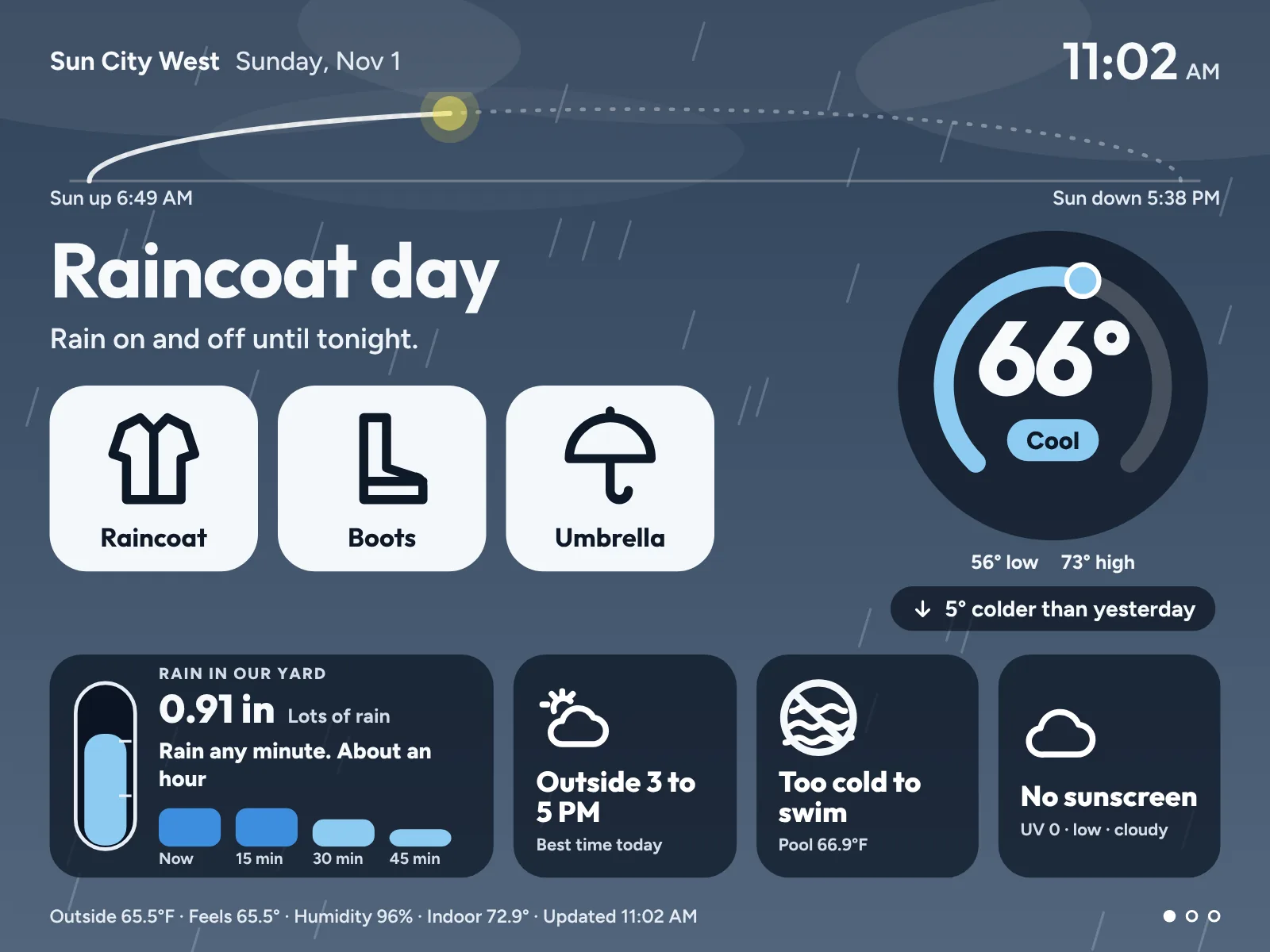
The display rotates through 3 slides on its own. Tap the right side of the screen to move ahead and the left side to go back.
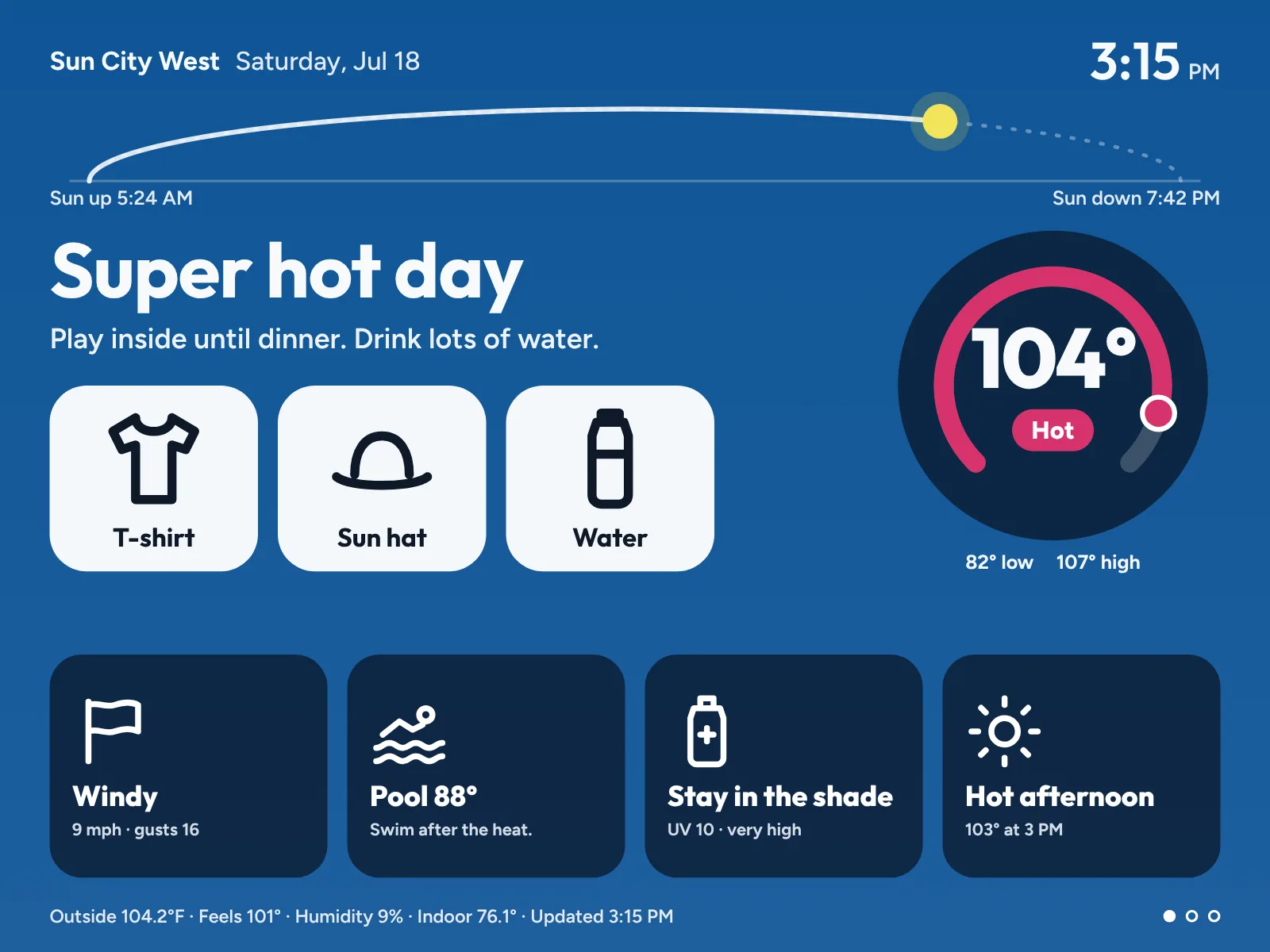
Slide 1
What to wear and whether to grab an umbrella, with today's low and high and how it compares to yesterday.
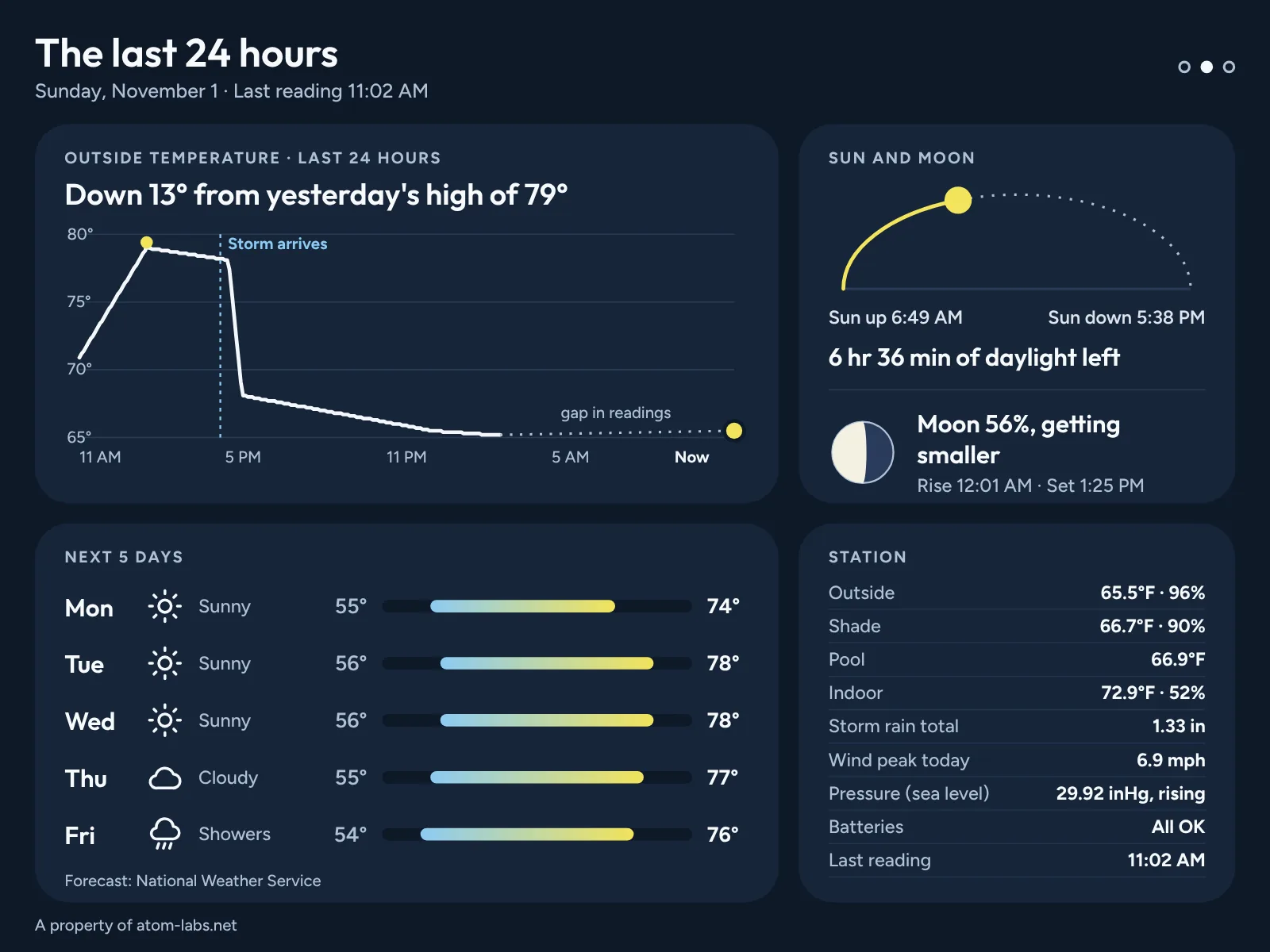
Slide 2
The slide for grown-ups. What happened overnight and what the week looks like.
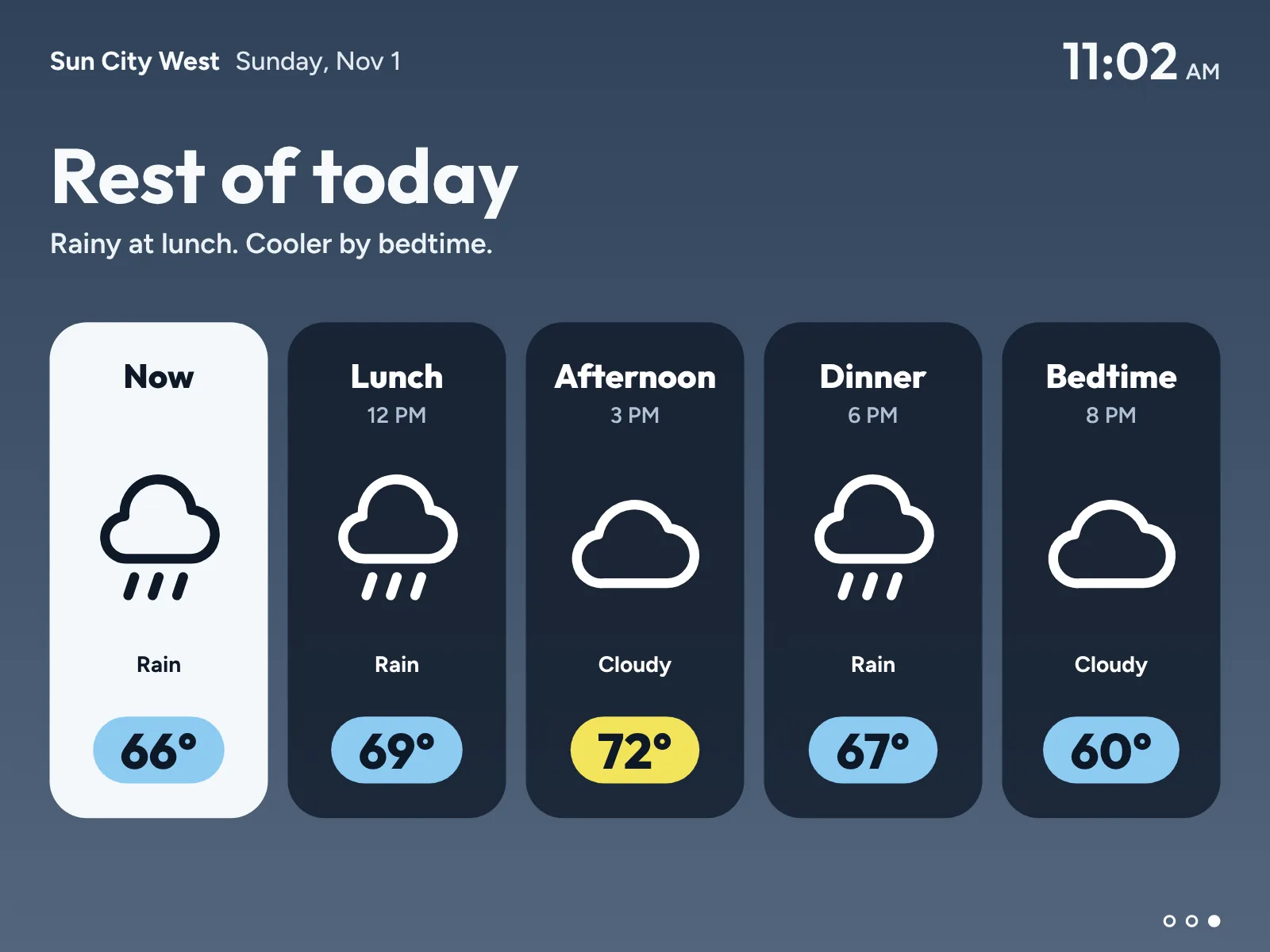
Slide 3
Now, lunch, afternoon, dinner and bedtime. One look tells the family how the day goes.
It never makes up a number. If your station goes quiet, the screen says so and keeps the time of the last reading. A sensor that stops reporting hides its card instead of guessing.
Templates
Start from 21 ready-made templates and 4 starter sets: Family Kitchen, Grownup Glance, Big Type and Home Watch. Big type for across the room, a grown-up view for the office, a garden view for the yard.
Pick the slides your display rotates through and how long each one shows. Free holds 3 slides.
Rain, pool, wind, records, watering, air quality and more, with a live preview of your own station. New cards keep coming. Comes with paid plans.
Members share what they build. We review each one, then any household can install it. The gallery grows every time someone shares.
Ask it
Connect your AI agent to your station and ask in plain words. It answers from your station's readings, history and records, not the airport. We've tested it with Claude and Claude Duet, OpenAI Dots, Gemini, Grok Bot and Meta Muse.
Agent access comes with paid plans when they open. Everything you can ask.
What's the temperature in my yard?
It's 76.1°F in your yard right now, and the pool is 67.3°F.
Hear about it
Always-on agents like Claude Duet, OpenAI Dots and Meta Muse can check your yard on a schedule. Ask yours to look every morning and tell you only when something needs you: a freeze tonight, rain starting, a big gust coming. Watches come with Gold and Platinum.
High 79° at 3:55 PM. Low 51° at 6:35 AM. No rain. 4 dry days in a row. Top gust 7 mph at 12:30 PM. The forecast said 78°. Your yard hit 79°. Coldest night since this station started.
Every day, Station Signals saves the forecast issued before the day began and puts it next to what your yard actually did. After a few weeks, you'll know whether your yard runs warmer or colder than the forecast.
Why we built it
Your Ambient console stays plugged in. It sends your readings to AmbientWeather.net, and Station Signals picks them up from there. Nothing about your station changes.
I run a WS-2000. The console sits on my kitchen counter. My wife and grandkids had a hard time reading it. Visitors asked which number was outside and which was inside. The two temperatures sit in the same kind of ring, in the same colors, at almost the same size. Nothing on the screen says what to do. So I built the screen my family actually uses.
Every number looks alike
The answer first
The call, like Raincoat day or No swim, is the biggest thing on the screen. Everything else is smaller and sits below it.
The large temperature always comes from your yard. Indoor shows only in the small print, labeled Indoor. Public pages hide it unless you choose to show it.
The temperature color always comes with a word: Cold, Cool, Just right, Warm or Hot. It reads the same for people with red and green color blindness.
How it works
Have three things ready: a station that reports to AmbientWeather.net, the login for that account, and a screen with a web browser.
In your AmbientWeather.net account settings, go to API Keys and create a key. Paste it into Station Signals. We load up to a year of your station's history, so your records work on day one.
Pick the word you'd say out loud: yard, garden, cabin. That's what your AI agent answers to when you ask “Did it rain in the garden?”
Pick an address like stationsignals.app/yourname. Keep it behind a password or make it public. Open it on any screen in the house and add it to the Home Screen.
Add Station Signals to your agent once and ask away. Comes with paid plans when they open. How it works.
We're letting households in from the wait list a few at a time, and we read every application. Join the wait list and you'll hear first.
Any screen with a browser
Most homes have an old tablet or laptop that does nothing all day. Plug it in, open your display and leave it on the counter, the desk or the wall. It updates itself every minute, so nobody has to touch it.
Needs iPadOS 15 or later: iPad Air 2, iPad mini 4, iPad 5th generation and every newer model, plus every iPad Pro. Older iPads that stop at iOS 12, like the first iPad Air, can't run it.
Use Silk on a Fire tablet or Chrome on Android, updated to the newest version the tablet will install.
Open your display in Chrome, Edge or Safari and go full screen.
Open the live demo on the device. If the slides turn on their own, your display will run there too.
Questions
Three things. An Ambient Weather station that reports to AmbientWeather.net. A free Ambient API key, which you create in your AmbientWeather.net account settings. A screen with an up-to-date web browser, like a tablet, a laptop or a TV with a browser. It works best in a current version of Chrome, Edge or Safari.
Ambient Weather stations that report to AmbientWeather.net and send an outdoor temperature. Ambient says the WS-2000, WS-5000, WS-4000, WS-2902, WS-1965 and WS-1550-IP all report to its network. We build and test on a WS-2000. The other models use the same Ambient data feed, but we have not tested each one. To check yours, sign in at AmbientWeather.net. If it shows an outdoor temperature there, Station Signals can read it.
Nothing during the beta. Every household is on the Free plan, which covers 1 station and 2 logins. No card is needed. Paid plans come later.
An iPad needs iPadOS 15 or later. That covers iPad Air 2, iPad mini 4, iPad 5th generation and every newer model, plus every iPad Pro. Older iPads that stop at iOS 12 can't run it. A Fire or Android tablet needs an up-to-date Silk or Chrome. The quickest check is to open the live demo on the tablet. If the pages turn on their own, it works.
Yes. The live demo is a real published display running on an Ambient Weather station. Your own display runs the same way once you connect your station with your Ambient API key.
Yes, and it is free. A free AmbientWeather.net account can create one, so AWN+ is not required. If you pay for AWN+, your key works the same way. In your account settings there, scroll to API Keys, create a key and paste it into Station Signals. We check it with Ambient right away. If your account has more than one station, you pick the one for this home. Your key is encrypted before it is stored and is never sent back to the browser.
We keep it. Once your display is published, Station Signals saves your station's readings, and nothing is deleted when your plan changes, Free included. Removing the station from your account removes its history. Paid plans, when they arrive, will decide how far back you can look and which tools work on that history. They never decide what we keep.
The display shows only what your station sends. When a reading is missing, its card hides. It never shows a zero or a guess in its place. A WS-1965 has no UV sensor, so UV stays hidden. Pool and shade come from extra Ambient temperature sensors, like a floating pool thermometer. In Station setup you mark which sensor is the pool and which is the shade.
Yes. Start from 21 ready-made templates and 4 starter sets, and choose which slides your display rotates through and how long each one shows (Free holds 3 slides). Paid plans also build their own templates from 40 cards: stack them in sections or place and size each one on a grid, keep the ones you always want on screen, pick what fills in when a sensor is missing, the look and who it is for, with a live preview of your own station. Templates other households share appear in the gallery once we review them, and any household can install them.
No. A published page shows the place name you type, like your town. Your station's coordinates are removed before anything reaches the screen.
Readings come from your own station. The hourly and 5-day forecast comes from the National Weather Service, which covers the United States.
The screen says so. It keeps the last reading on screen with its time and never fills a gap with a guess. A sensor that stops reporting hides its card.
Yes. Nobody needs a login to watch the display. Open your published page on as many screens as you like, in the kitchen, the office or a bedroom. Keep it behind a password, or make it public. A login is only for changing the display. To give someone their own login, invite them from Settings. The Free plan includes 2 logins.
Yes. Station Signals connects to AI agents that work with MCP servers. We've tested it with Claude and Claude Duet, OpenAI Dots, Gemini, Grok Bot and Meta Muse. Ask "What's the temperature in my yard?" or "Will it freeze tonight?" and it answers from your own station: right now, the forecast for your spot, rain totals, yesterday and records. It can also check your yard on a schedule and tell you when something needs attention. Agent access comes with paid plans when they open. Join the wait list and tell us which agent you use.
Only your station: its readings, rain totals, history and records, plus the station name and place name you typed. It never sees your Ambient API key, your exact location or other households, and it can't change anything. You approve it once, and you can remove it in Settings any time.
Made for Ambient Weather stations that report to AmbientWeather.net. Free during the beta. No card needed.